


Qordenate runs on your phone with the same multilingual AI feature set as the web app. Host, schedule and join meetings, use live voice translation, voice cloning, Universal Captions, VoiceBridge and Smart Recap, and join podcasts and webinars, from an iPhone, iPad or Android device.
Mobile access is included on every plan, including the free Basic plan. There is no separate mobile subscription, and no meeting feature is locked behind the desktop.
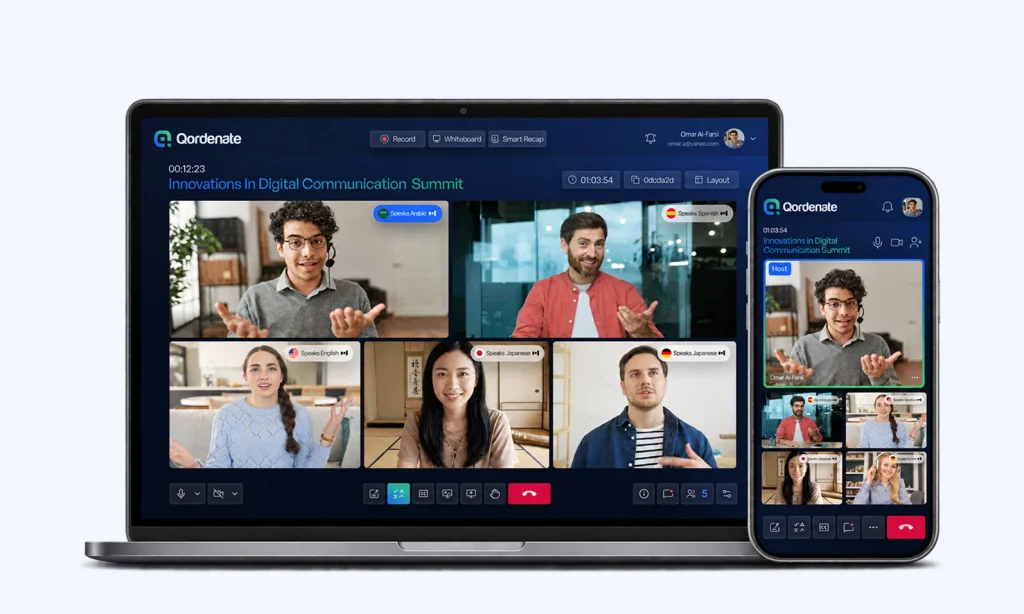
What you can do in the app
Qordenate Web App vs Mobile App
Complete multilingual AI capabilities wherever you work
| Capability | ||
|---|---|---|
| Host and schedule meetings |
Yes |
Yes |
| Choose the meeting’s languages as host |
Yes |
Yes |
| Join by link or room ID |
Yes |
Yes |
| Change your language during a meeting |
Yes |
Yes |
| Live voice translation |
Yes |
Yes |
| Voice cloning |
Yes |
Yes |
| Universal Captions |
Yes |
Yes |
| VoiceBridge |
Yes |
Yes |
| Smart Recap |
Yes |
Yes |
| Multilingual chat |
Yes |
Yes |
| Screen share |
Yes |
Yes |
| Virtual backgrounds |
Yes |
Yes |
| AI collaborative whiteboard |
Yes |
Yes |
| Local recording |
Yes |
Yes |
| Cloud recording (Pro, Business, Scale, Enterprise) |
Yes |
Yes |
| Join a podcast |
Yes |
Yes |
| Host or create a podcast |
Yes |
No |
| Join a webinar |
Yes |
Yes |
| Create, configure or host a webinar |
Yes |
No |
| Book and pay for a webinar |
Yes |
No |
| Subscribe to a plan |
Yes |
Yes
Pro Plan & Language Pass via App Store or Google Play. Other subscriptions can be done on the web app. |
| Buy a Language Pass |
Yes |
Yes |
| Cancel a subscription |
Yes |
Yes
Cancel Pro Plan via App Store or Google Play. Other cancellations can be done on the web app. |
Two things are web-only: hosting a podcast and creating, configuring or paying for a webinar. You can join both from your phone once a host has set them up.
Which devices are supported
- iPhone and iPad — Qordenate for iOS, running iOS 16.0 or later
- Android phones and tablets — Qordenate for Android, running Android 7.0 or later
- Any desktop or laptop — Qordenate in Chrome, Edge, Safari, Firefox or Opera, with no installation
For the best experience, keep the app updated, use a stable connection, and allow microphone and camera permissions when prompted.
One account, both platforms
Qordenate works in your browser and in the Qordenate mobile app for iOS and Android. Your account, plan, AI preferences and saved voices are shared across both, so you can schedule a meeting on your laptop and join it from your phone.
Basic, Pro and the Language Pass are for one user. That means one person across as many devices as they like, not two people sharing one login. Business and Scale add seats for colleagues who host their own meetings.
Joining from your phone when someone else pays
If the host is on Pro, Business, Scale or Enterprise, their plan covers translation for everyone in the meeting. You can join from the app or a mobile browser without a plan of your own. See Language Pass and who pays for translation.
Get the app

Frequently asked questions
Is the Qordenate mobile app free?
Can I host a meeting from my phone?
Does live voice translation work on mobile?
Do I need a plan to get translation on my phone?
Do I need the app to join a meeting from my phone?
Can I use the same account on my phone and my computer?