


Buying a plan inside the Qordenate app is processed as an in-app purchase by Apple or Google, not by Qordenate directly. That changes three things compared with subscribing on the web.
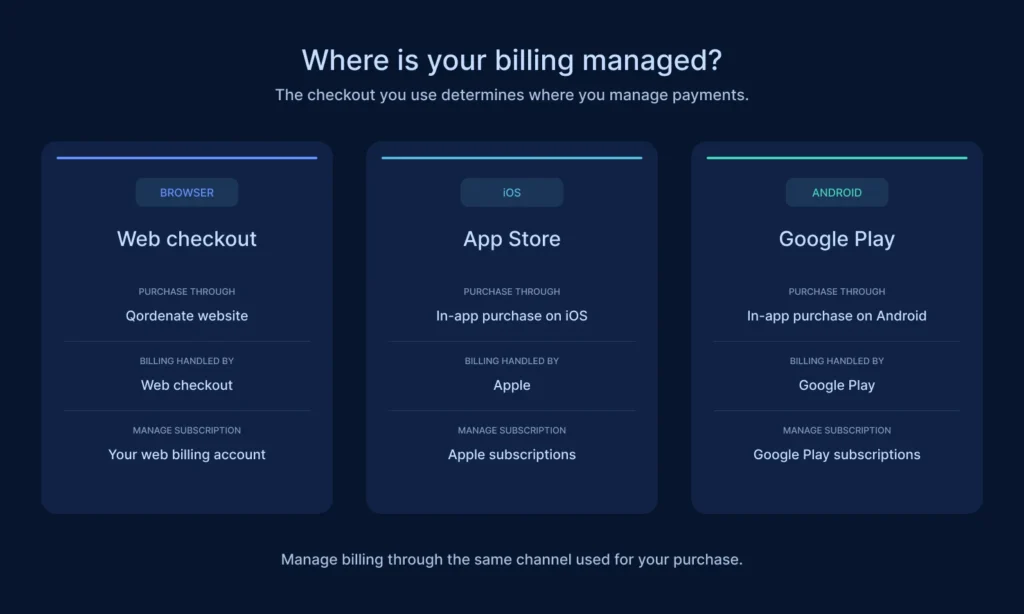
1. Payment comes from your store account
Apple or Google charges the payment method saved on your App Store or Google Play account. You will not enter card details inside Qordenate.
2. Cancellation happens in the store, not in the app
You cannot cancel an in-app subscription from inside Qordenate. Use the store that processed the purchase.
On iPhone or iPad
- Open Settings
- Tap your name at the top
- Tap Subscriptions
- Select Qordenate
- Tap Cancel Subscription
On Android
- Open the Google Play Store
- Tap your profile icon
- Tap Payments and subscriptions
- Tap Subscriptions, then select Qordenate
- Tap Cancel subscription
Your plan stays active until the end of the billing period you have already paid for, then reverts to Basic.
3. Receipts come from the store
Your billing history sits in your App Store or Google Play purchase history. Qordenate also emails confirmation to your registered address.
What you cannot buy in the app
Business and Scale Plans. Business and Scale plans include seats and must be booked on the web app.
Webinars. Webinars are paid per event and must be booked on the web app. Once booked there, attendees can join the webinar from mobile as normal.
Does my plan work on both platforms?
Yes. A plan bought in the app activates on the web app too, and a plan bought on the web works in the app. One subscription, both platforms.
Charged but the plan did not activate?
- Check your store purchase history to confirm the charge went through
- Log out of Qordenate and log back in
- Allow 5 to 10 minutes for processing
- Contact support with your store transaction ID
Frequently asked questions
Can I get a refund through Qordenate? Refunds for in-app purchases are handled by Apple or Google under their own policies. Contact the store that processed the payment.
I subscribed on my phone. Do I need to subscribe again on the web? No. One subscription covers both platforms.
Why is there no cancel button in the app? Apple and Google require in-app subscriptions to be managed through their subscription settings.
Can I switch from in-app billing to web billing? Cancel the in-app subscription first, let it run to the end of the paid period, then subscribe on the web app.